



Help Page Content
Related Opportunities
Using the Related Opportunities functionality, grantors may associate multiple opportunities with each other. You may do this if a new opportunity is created to replace a previous one, to aid your applicants in the grant search process, or for other reasons as determined by the grantor agency.

How to Add a Related Opportunity
Access the Manage Opportunity page.
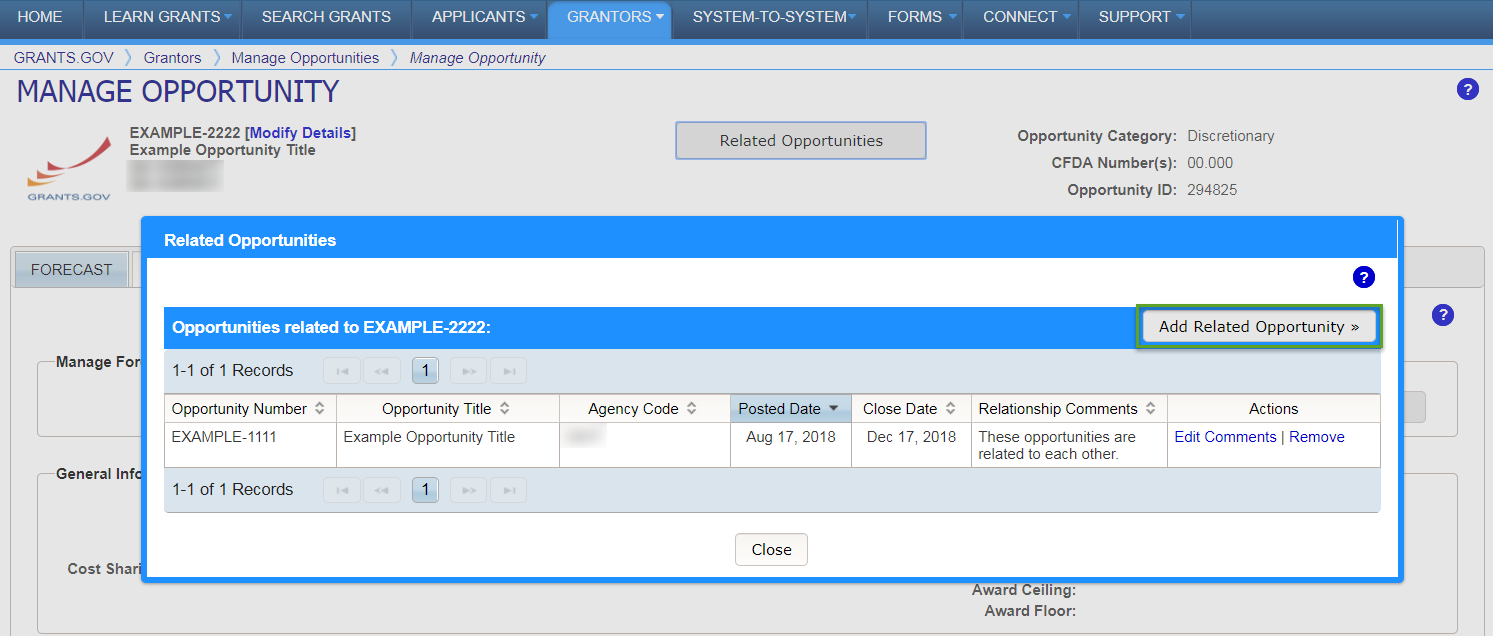
Click the Related Opportunities button near the top of the Manage Opportunity page.
Click the Add Related Opportunity button on the Related Opportunities modal.
Enter the Opportunity Number field with the opportunity you wish to create a relationship to.
Enter comments explaining the relationship between the opportunities in the Relationship Comments field.
Click the Add button to complete the process or the Cancel button to return to the Related Opportunities modal.
How to Edit Relationship Comments
Access the Manage Opportunity page.
Click the Related Opportunities button near the top of the Manage Opportunity page.
Click the Edit Comments link in the Actions column.
Click the Save button to complete your changes or the Cancel button to return to the Related Opportunities modal.
How to Remove Relationship
Access the Manage Opportunity page.
Click the Related Opportunities button near the top of the Manage Opportunity page.
Click the Remove link in the Actions column.
Click the Remove button to confirm the process or the Cancel button to return to the Remove Opportunity Relationship modal.